



Регулировка наклона ключ к комфорту и эффективности
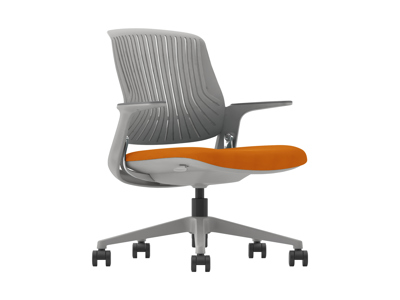
В современном мире, где многие из нас проводят долгие часы за рабочими столами, комфорт и эффективность становятся не просто желательными, а необходимыми условиями для поддержания здоровья и продуктивности. Одним из ключевых аспектов, который часто упускается из виду, является регулировка наклона различных элементов рабочего места. Будь то стул, стол или монитор, правильная настройка наклона может кардинально изменить ваше самочувствие и результаты работы. В этой статье мы подробно рассмотрим, почему регулировка наклона так важна, как её правильно осуществлять и какие преимущества она приносит.
Введение в тему регулировки наклона
Регулировка наклона – это процесс изменения угла наклона различных объектов, таких как спинка стула, поверхность стола или экран монитора, чтобы адаптировать их под индивидуальные потребности пользователя. Эта простая, но мощная функция может значительно повысить комфорт, снизить усталость и предотвратить множество проблем со здоровьем, связанных с длительным сидением. В контексте эргономики – науки о проектировании рабочих мест для оптимального взаимодействия человека и машины – регулировка наклона играет crucial role. Она помогает создать среду, которая минимизирует физическое напряжение и максимизирует продуктивность.
Исторически, концепция регулировки наклона возникла вместе с развитием офисной мебели в XX веке. Раньше столы и стулья были статичными, что часто приводило к болям в спине, шее и другим issues. С появлением adjustable furniture, люди получили возможность персонализировать свои рабочие места. Сегодня, с ростом удалённой работы и home offices, важность этой функции только усилилась. Исследования показывают, что proper adjustment can reduce musculoskeletal disorders by up to 50%, making it a vital investment for anyone who values their well-being.
Почему регулировка наклона так важна?
Регулировка наклона важна по нескольким причинам, которые затрагивают как физическое здоровье, так и mental well-being. Во-первых, она способствует правильной осанке. Когда спинка стула или поверхность стола настроены под правильным углом, тело принимает естественное положение, reducing strain on the spine and muscles. Это предотвращает развитие chronic pain, such as backache or neck pain, which are common among office workers.
Во-вторых, регулировка наклона enhances blood circulation. Например, наклон стула позволяет распределить weight evenly, avoiding pressure points that can lead to numbness or fatigue. Это особенно важно для людей, которые сидят по многу часов в день. Кроме того, proper tilt adjustment can improve focus and productivity. Когда вам комфортно, вы меньше отвлекаетесь на дискомфорт и можете concentrate better on tasks. Studies have shown that ergonomic adjustments can boost productivity by 10-15%, making it a smart business decision as well.
В-третьих, регулировка наклона customizable to individual needs. Каждый человек имеет unique body proportions and preferences. Возможность adjust the tilt means that anyone, regardless of height or build, can find a comfortable position. Это inclusivity aspect makes it essential for diverse workplaces. For instance, a taller person might need a different chair tilt than a shorter one to maintain ergonomic alignment.
Наконец, в долгосрочной перспективе, регулировка наклона helps prevent serious health issues. Repetitive strain injuries, such as carpal tunnel syndrome or tendonitis, can be mitigated by proper desk and chair adjustments. By investing time in setting up your workspace correctly, you're investing in your future health and avoiding costly medical bills down the line.
Как регулировать наклон стула для максимального комфорта
Регулировка наклона стула – это фундаментальный шаг к созданию ergonomic workspace. Вот пошаговое руководство, как это сделать правильно. Начните с определения ideal seat height. Сядьте на стул и убедитесь, что ваши feet are flat on the floor with knees at a 90-degree angle. Затем перейдите к наклону спинки. Большинство ergonomic chairs have a tilt mechanism that allows you to adjust the backrest angle.
First, loosen the tilt tension knob usually located under the seat. Поворачивайте его, чтобы найти balance between support and mobility. Угол наклона спинки должен быть between 100 and 110 degrees from vertical. Это положение поддерживает естественный изгиб позвоночника и reduces pressure on the lower back. Если ваш стул имеет additional lumbar support, adjust it to fit the curve of your back. Это обеспечит дополнительный комфорт и предотвратит slouching.
Next, consider the seat pan tilt. Некоторые стулья позволяют наклонять сиденье вперед или назад. A slight forward tilt (about 5-10 degrees) can encourage better posture by tilting the pelvis forward, which aligns the spine. Однако убедитесь, что это не causes discomfort or instability. Test different settings while sitting for a few minutes to find what feels best for you.
Важно также учитывать armrests. Они должны быть adjusted so that your elbows are at a 90-degree angle when typing. Если armrests мешают, возможно, их стоит опустить или убрать altogether. Remember, the goal is to create a position where your body feels relaxed yet supported. Регулярно проверяйте настройки, так как ваши потребности могут change over time due to fatigue or other factors.
Для дополнительного комфорта, используйте footrest if your feet don't reach the floor comfortably. Это поможет maintain proper leg alignment and reduce strain. В целом, потратьте 10-15 minutes initially to fine-tune your chair, and make minor adjustments as needed throughout the day. Это small investment of time can pay off in big ways in terms of comfort and health.
Регулировка наклона стола: основы и преимущества
Регулировка наклона стола – это another critical aspect of an ergonomic setup. Особенно с rise of standing desks, возможность change the angle of the work surface has become increasingly popular. Наклонный стол позволяет position your keyboard, mouse, and documents at optimal angles, reducing wrist strain and improving readability.
Start by adjusting the desk height. Стол должен быть на уровне, при котором ваши elbows are at a 90-degree angle when typing. Если стол регулируется по высоте, установите его accordingly. Затем, если ваш стол имеет функцию наклона, используйте её для создания slight upward tilt (about 5-15 degrees) for the work surface. Это особенно полезно для tasks that involve writing or drawing, as it brings the surface closer to your eyes and hands, reducing neck bending.
Для компьютерных рабочих мест, consider a monitor arm that allows tilt adjustment. Экран должен быть positioned so that the top is at or slightly below eye level, with a tilt of about 10-20 degrees backward to minimize glare and reduce eye strain. Это помогает maintain a neutral neck position, preventing stiffness and pain.
Преимущества регулировки наклона стола include improved posture, reduced risk of repetitive strain injuries, and enhanced productivity. Например, при правильном наклоне, ваши wrists remain straight while typing, which can prevent conditions like carpal tunnel syndrome. Additionally, a tilted surface can make it easier to read documents without hunching over, thus saving your back from unnecessary stress.
Практические советы: используйте protractor or a smartphone app to measure angles accurately. Start with small adjustments and observe how your body responds. Если вы чувствуете discomfort, revert to previous settings and try again. Remember, the ideal tilt may vary depending on your tasks – for instance, a steeper tilt might be better for drafting, while a flatter one suits general computer work.
Влияние регулировки наклона на здоровье
Правильная регулировка наклона оказывает profound impact on health, particularly in preventing musculoskeletal disorders. Когда рабочие места ergonomically designed, они reduce physical stress on the body. Например, наклон спинки стула distributes weight evenly, lowering the risk of lower back pain, which affects millions of people worldwide.
Studies have shown that improper sitting posture can lead to decreased blood flow, contributing to issues like varicose veins or deep vein thrombosis. Регулировка наклона помогает promote circulation by allowing subtle movements and shifts in position. Это dynamic sitting encourages muscle activity and prevents stagnation, which is crucial for overall vascular health.
Кроме того, регулировка наклона can alleviate neck and shoulder pain. При правильном угле монитора и стола, голова и шея остаются в neutral position, reducing strain on the cervical spine. Это особенно важно для those who spend long hours on computers, as it can prevent chronic conditions like text neck.
Психологически, комфортное рабочее место enhances mental well-being. Когда вы free from physical discomfort, you're less likely to experience stress or anxiety related to work. Это может lead to better job satisfaction and reduced absenteeism. In fact, companies that invest in ergonomic furniture often report higher employee morale and lower healthcare costs.
Для долгосрочного здоровья, регулярная регулировка наклона служит preventive measure. Она encourages good habits and awareness of body mechanics. By making small adjustments daily, you can avoid the cumulative effects of poor posture, ensuring a healthier future. Советы: incorporate stretching breaks every 30 minutes to complement ergonomic adjustments and keep your body flexible.
Практические советы по настройке рабочего места
Чтобы максимизировать benefits of tilt adjustment, follow these practical tips for setting up your workspace. First, assess your current setup. Sit in your chair and note any areas of discomfort. Use a mirror or ask a colleague to check your posture from the side –你的背 должно быть прямым, а плечи расслабленными.
Invest in quality furniture that offers multiple adjustment options. Look for chairs with tilt tension controls, lumbar support, and adjustable armrests. For desks, consider models with height and tilt adjustability. Если бюджет allows, standing desks with memory settings can make adjustments effortless.
Set aside time for initial setup. Dedicate 15-30 minutes to adjust your chair, desk, and monitor. Use online guides or apps that provide ergonomic recommendations based on your height and weight. For example, many websites offer calculators for ideal desk height and monitor position.
Make adjustments incrementally. Change one setting at a time and test it for a day before making further changes. Это поможет identify what works best for you without overwhelming your body. Keep a journal of settings that feel comfortable for different tasks, such as typing versus reading.
Educate yourself on ergonomic principles. Understand terms like neutral posture, which refers to positions where joints are aligned and muscles are relaxed. Resources from organizations like OSHA or ergonomic associations can provide valuable insights.
Finally, maintain your setup. Regularly clean and check adjustment mechanisms to ensure they function smoothly. If you share workspace with others, reset adjustments to your preferences each time you use it. By taking these steps, you'll create a workspace that supports both comfort and efficiency.
Заключение: инвестируйте в свой комфорт и эффективность
В заключение, регулировка наклона – это не merely a luxury but a necessity for anyone seeking to improve their comfort and efficiency at work. Путем careful adjustment of chairs, desks, and monitors, you can prevent health issues, boost productivity, and enhance overall well-being. Remember that small changes can make a big difference – потратьте время на настройку своего рабочего места, и ваше тело will thank you in the long run.
Начните сегодня: оцените своё текущее setup, внесите необходимые корректировки и наслаждайтесь benefits of a properly adjusted workspace. Whether you're in an office or at home, prioritizing ergonomics is an investment in your health and success.
